Mostrando postagens com marcador Android. Mostrar todas as postagens

sexta-feira, 26 de janeiro de 2018

Saiba como apagar de forma segura os dados do seu smartphone Android

Computerworld / EUA em 25/01/2018

Imagem: Motorola
É um ponto inevitável quando você tem um smartphone: a hora em que um modelo mais novo chega e seu bom e velho aparelho não é mais necessário.
Talvez a sua empresa tenha te comprado um novo smartphone Android. Talvez o seu antigo estivesse muito lento. Ou talvez você apenas goste muito de aparelhos eletrônicos e não conseguiu resistir a um determinado novo modelo.
Qualquer que seja o caso, é algo comum hoje em dia se encontrar com um celular extra em casa. E, apesar de poderem existir muitos usos práticos para um aparelho Android antigo, também há uma hora em que a melhor escolhe é vender, doar ou apenas passá-lo para frente. 
Antes de fazer isso, no entanto, você vai querer se certificar de que apagou e removeu de forma segura todos os traços do seu passado – porque a última coisa que você iria querer é que o novo dono do aparelho acabe se deparando com os seus dados pessoais ou profissionais. 
1-Certifique-se que o aparelho está criptografado
O maior medo na hora de “zerar” um aparelho Android é a possibilidade improvável, mas não impossível, de alguém depois usar ferramentas de recuperação de dados para tentar acessar os seus dados. 
É por isso que o primeiro e mais importante passo na hora de apagar os seus dados do aparelho Android é criptografar o armazenamento local. Desse jeito, mesmo que o seu aparelho acabe nas mãos de uma pessoal com más intenções – e mesmo que essa pessoa consiga recuperar os dados apagados – as suas informações pessoais permanecerão virtualmente ilegíveis.
Se o seu smartphone é relativamente novo, há uma boa chance de que ele já esteja criptografado por padrão. Mas vale verificar isso para ficar tranquilo. Abra o aplicativo de Configurações, depois vá até a seção de Segurança e busque por uma opção de Criptografia (a palavra e a localização exatas podem variar dependendo do aparelho, mas não deve ser difícil achar essa informação nas configurações). Lá, você poderá ver se o seu smartphone está realmente criptografado – e iniciar o processo caso não esteja.
Vale notar que o processo pode levar algum tempo, e você não poderá usar o smartphone enquanto não terminar. Depois que for devidamente finalizado, no entanto, você pode ficar tranquilo sabendo que os seus dados possuem uma camada poderosa de proteção contra possíveis olhos curiosos.
2-Remova o SIM card e qualquer cartão de armazenamento
Agora que os seus dados estão protegidos, tire um momento para confirmar que o chip da sua operadora e qualquer cartão de memória (normalmente SD ou microSD) tenham sido devidamente removidos do smartphone.
É preciso fazer isso porque os dois cartões estão conectados com a sua identidade e cheios de dados particulares, e não há razão para deixar nenhum deles em um aparelho que não será mais seu.
3-Realize uma restauração de fábrica para apagar totalmente o seu aparelho
Essa parte é a verdadeira “limpeza” do smartphone: vá até o app Configurações e busque por uma seção chamada Fazer Backup e Restaurar – caso não a encontre, busque por Sistema ou Configurações Gerais e então tente encontrar os botões Fazer Backup e Restaurar ou apenas Restaurar
Encontre e selecione a opção para realizar a restauração de fábricas e selecione qualquer opção subsequente para apagar todos os tipos de dados e contas. O sistema provavelmente te dará uma ou duas telas de confirmação e te pedirá para inserir sua senha ou padrão. Completadas essas tarefas, basta esperar enquanto o Android faz o serviço (que pode levar alguns minutos).
4-Remova qualquer associação de contas
Por fim, tire alguns minutos para remover manualmente o smartphone da sua conta Google e qualquer outra conta com a qual o aparelho possa estar associado.  
Para o caso do Google, apenas acesse o buscador e pesquise por Google Device Manager. Feito isso, clique no link e então encontre o seu aparelho na lista, clique nele e selecione o botão (vermelho) Remover. Pronto: isso vai acabar com qualquer conexão do dispositivo com a sua conta do Google. 
Depois é hora de pensar com calma em outras opções similares – ou seja, apps cujas contas estão conectadas ao seu smartphone. A lista pode incluir gerenciadores de senha como LastPass ou apps de autenticação como Authy. 
Feito isso, você está pronto: seu aparelho Android foi limpo de maneira segura e agora está pronto para encontrar um novo lar.

segunda-feira, 8 de janeiro de 2018

New adware attack bombard phones & prevent users from disabling ads

Por Wagas em 08/01/2018 no site HackRead


It is just another day for Android users who are yet again under adware attack by malicious apps on Google Play Store.
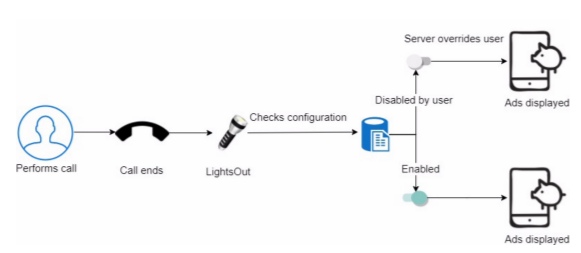
Researchers at Check Point Software Technologies have identified a new mobile adware program, dubbed as LightsOut, in at least 22 illegitimate Android flashlight and utility apps on Google Play Store. These apps have now been removed from the Play Store, but prior to their removal, the apps had been downloaded between 1.5 and 7.5 million times.
What happens is that when any of these 22 apps get downloaded, the user’s decision to disable ads from illegitimate websites would get overridden by the malicious script and then the app’s icon would be hidden so as to prevent its deletion from the device. It is quite clear that the real objective of this campaign is to generate illegal ad revenue at the expense of the innocent and unsuspecting Android users.
New adware attack bombard phones & prevent users from disabling ads
As per the findings of some users, some of these ads forced them to answer calls or perform other activities while some noted that despite installing the ad-free version of the Android app, the malicious ad activity continued. Google was informed about the presence of suspicious apps on Play Store, and after they were removed.
“Despite the vast investment Google has recently made in the security of their App Store, ‘LightsOut’ reminds us once again that users need to be wary of downloading from App Stores and are advised to have protection while using them. Many users are still unaware of the dangers lurking for them and continue to install fishy apps such as flashlights,” said Check Point’s technical blog post.
Check Point researchers released a video as well showing the way the attack occurred. The video shows how the infected app offered a checkbox and control panel to the user for enabling or disabling different services such as ads. After different actions such as ending of a call, unlocking of the home screen, plugging in of a charger or enabling of Wi-Fi connection, ad displaying event got triggered.
The ads were not directly linked to LightsOut activity and the app icon was also hidden, therefore, users were clueless about what was causing them to appear. Resultantly, the device gets bombarded with ads and the user has no other choice but to interact with the malicious ads, even to perform the most basic functions, such as to answer a phone call.
The malicious adware campaign was reported by Check Point in its blog post published on January 5. The company noted that in order to prevent such campaigns from invading our mobiles, it is important to firstly, download apps cautiously and carefully, secondly, to have advanced a mobile threat protection software installed apart from anti-virus software.
List of malicious apps is available here.

sexta-feira, 5 de janeiro de 2018

New Android Malware Disguised as Uber App

By Waqas on 

t is just another day with just another Android malware targeting unsuspecting users.
Last time Uber was in news for hiding massive data breach of 75 million accounts from its users and paying $100,000 to the culprits. Now, the IT security researchers at Symantec have discovered malware that secretly spies upon Uber’s Android app and extracts private, sensitive data such as users’ passwords. This allows attackers to hijack the accounts owned by Uber users and has been dubbed as Android.Fakeapp.
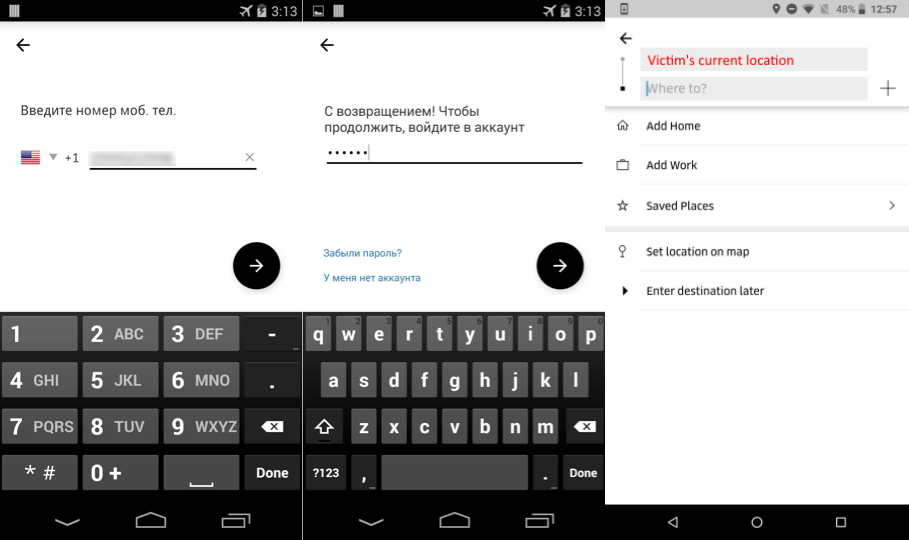
The Android malware is capable of mimicking Uber’s interface; it was identified after various Trojan pop-ups were observed by the researchers on the screen at regular intervals. The purpose was to fool the users into giving away their phone numbers and passwords. When the user presses Enter, the malware sends login credentials to a remote server. The attackers would receive the information and use it to compromise accounts and sell them off to other hackers on the black market.
“In order to steal a user’s login information, the malware pops up on-screen regularly and prompts the user to enter their Uber username and password. Once a user falls for the attack and enters their information, it gets swept up by the attacker.”
This Fakeapp variant also gives a false sense of security to the user apart from showing a fake log-in screen of Uber. This is done to prevent users from suspecting any foul play and changing their password before the malware is able to obtain the required information.
New Android Malware Disguised as Uber App
Fake Uber app screens for users to enter their registered mobile number and password while screen of the legitimate app showing the user’s current location (Screenshot: Symantec)
According to Symantec’s findings, the case shows that malware creators are always eagerly looking to find new social engineering tricks to trap users.
They recommended that users must keep their software updated and install a reliable anti-malware app to prevent malware from infecting the device. Furthermore, it is suggested that apps from unfamiliar websites are not downloaded at all.
“We recommend only downloading apps from trusted sources. However, we want to protect our users even if they make an honest mistake and that’s why we put a collection of security controls and systems in place to help detect and block unauthorized logins even if you accidentally give away your password.”
To cover up the stealing of credentials, the malware accesses Uber app’s deep links to show the current location of the user, which gives away the feeling that user is using legitimate Uber app. Dinesh Venkatesan, the threat analysis engineer at Symantec, stated:
“To avoid alarming the user, the malware displays a screen of the legitimate app that shows the user’s current location, which would not normally arouse suspicion because that’s what’s expected of the actual app.”
The malware is not as widespread as we might believe it to be and a majority of Uber users are protected from it. However, it malware affects users in Russian-speaking countries at the moment and widescale distribution of the campaign is currently not expected by researchers.

terça-feira, 19 de dezembro de 2017

This New Android Malware Can Physically Damage Your Phone


phone-swollen-battery
Due to the recent surge in cryptocurrency prices, not only hackers but also legitimate website administrators are increasingly using JavaScript-based cryptocurrency miners to monetize by levying the CPU power of your PC to mine Bitcoin or other cryptocurrencies.


Just last week, researchers from AdGuard discovered that some popular video streaming and ripper sites including openload, Streamango, Rapidvideo, and OnlineVideoConverter hijacks CPU cycles from their over hundreds of millions of visitors for mining Monero cryptocurrency.


Now, researchers from Moscow-based cyber security firm Kaspersky Lab have uncovered a new strain of Android malware lurking in fake anti-virus and porn applications, which is capable of performing a plethora of nefarious activities—from mining cryptocurrencies to launching Distributed Denial of Service (DDoS) attacks.


Dubbed Loapi, the new Android Trojan can perform so many more malicious activities at a time that can exploit a handset to the extent that within just two days of infection it can cause the phone's battery to bulge out of its cover.

Described as a "jack-of-all-trades" by the researchers, Loapi has a modular architecture that lets it conduct a variety of malicious activities, including mining the Monero cryptocurrency, launching DDoS attacks, bombarding infected users with constant ads, redirecting web traffic, sending text messages, and downloading and installing other apps.


Loapi Destroyed An Android Phone In Just 2 Days

android-malware
When analyzed a Loapi sample, Kaspersky's researchers discovered that the malware mines the Monero cryptocurrency so intensely that it destroyed an Android phone after two days of testing, causing the battery to bulge and deforming the phone cover.

According to researchers, the cybercriminals behind Loapi are the same responsible for the 2015 Android malware Podec. They are distributing the malware through third-party app stores and online advertisements that pose as apps for "popular antivirus solutions and even a famous porn site."


A screenshot in the Kaspersky blog suggests that Loapi impersonates as at least 20 variations of adult-content apps and legitimate antivirus software from AVG, Psafe DFNDR, Kaspersky Lab, Norton, Avira, Dr. Web and CM Security, among others.


Upon installation, Loapi forces the user to grant it 'device administrator' permissions by looping a pop-up until a victim clicks yes, which gives the malicious app the same power over your smartphone that you have.

This highest level privilege on a device would also make the Loapi malware ideal for user espionage, though this capability is not yet present in the malware, the Kaspersky researchers think this can be included in the future.


Loapi Malware Aggressively Fights to Protect Itself


Researchers also said the malware "aggressively fights any attempts to revoke device manager permissions" by locking the screen and closing phone windows by itself.


Loapi communicates with the module-specific command and control (C&C) servers, including advertisement module, SMS module and mining module, web crawler, and proxy module, for different functions to be performed on the infected device.


By connecting with one of the above-mentioned C&C servers, Loapi sends a list of legitimate antivirus apps that pose it danger and claims the real app as malware and urges the user to delete it by showing the pop-up in a loop until the user finally deletes the app.

"Loapi is an interesting representative from the world of malicious Android apps. It’s creators have implemented almost the entire spectrum of techniques for attacking devices: the Trojan can subscribe users to paid services, send SMS messages to any number, generate traffic and make money from showing advertisements, use the computing power of a device to mine cryptocurrencies, as well as perform a variety of actions on the internet on behalf of the user/device," the researchers concluded.
Fortunately, Loapi failed to make its ways to Google Play Store, so users who stick to downloads from the official app store are not affected by the malware. But you are advised to remain vigilant even when downloading apps from Play Store as malware often makes its ways to infect Android users.

terça-feira, 24 de outubro de 2017

Android Apps Infected with Sockbot Malware Turn Devices into Botnet


Android Apps Infected with Sockbot Malware Turn Devices into Botnet

Cybercriminals apparently are well aware of the fact that Minecraft is a truly profitable game perhaps that’s why they are eager on identifying new ways of exploiting it. Reportedly, there are a number of Minecraft oriented Android apps available on Google Play Store that are infecting devices and turning them into botnets.

According to research conducted by Symantec’ cybersecurity researchers, eight apps on Google Play Store are infected with an embedded malicious Trojan called Sockbot. The installation scope of this particular malware campaign is quite wide-ranged with approx. 600,000 to 2.6 million devices targeted so far. The apps initially posed as add-ons for Minecraft: Pocket Edition game to get posted at Google Play Android app store.

However, these are not official Minecraft game apps but only providing skins for changing the appearance of characters in the game. The apps have been designed to generate ad revenue through illegal ways. One of these eight apps was found to be communicating with a command and control server (C&C) for instructions to open a socket using SOCKS before creating a link with the targeted server. The C&C server provided a list of metadata and ads to promote ad requests. But in reality, the app is not meant to display ads but to compromise mobile devices for nefarious purposes.

After being installed on a device, the app asks for a range of permissions including displaying of alerts, accessing GPS data, open network connections, access Wi-Fi service and acquire read and write privilege on external storage device

terça-feira, 19 de setembro de 2017

Yet Another Android Malware Infects Over 4.2 Million Google Play Store Users

Swati Khandelwal
Em 14/09/2017 no site The Hacker News

android-play-store-malware
Even after so many efforts by Google, malicious apps somehow managed to fool its Play Store's anti-malware protections and infect people with malicious software.

The same happened once again when at least 50 apps managed to make its way onto Google Play Store and were successfully downloaded as many as 4.2 million times—one of the biggest malware outbreaks.

Security firm Check Point on Thursday published a blog post revealing at least 50 Android apps that were free to download on official Play Store and were downloaded between 1 million and 4.2 million times before Google removed them.

These Android apps come with hidden malware payload that secretly registers victims for paid online services, sends fraudulent premium text messages from victims' smartphones and leaves them to pay the bill—all without the knowledge or permission of users.

Dubbed ExpensiveWall by Check Point researchers because it was found in the Lovely Wallpaper app, the malware comes hidden in free wallpaper, video or photo editing apps. It's a new variant of malware that Mcafee spotted earlier this year on the Play Store.

But what makes ExpensiveWall malware different from its other variants is that it makes use of an advanced obfuscation technique called "packed," which compresses malicious code and encrypts it to evade Google Play Store's built-in anti-malware protections.

The researchers notified Google of the malicious apps on August 7, and the software giant quickly removed all of them, but within few days, the malware re-emerged on the Play Store and infected over 5,000 devices before it was removed four days later, Check Point said.

Here's How ExpensiveWall Malware Works:

android-play-store-malware
Once an app with ExpensiveWall—which researchers think came from a software development kit called GTK—is downloaded on a victim's device, the malicious app asks for user's permission to access the Internet, and send and receive SMS messages.

The internet access is used by the malware to connect the victim's device to the attacker's command and control server, where it sends information on the infected handset, including its location alongside unique hardware identifiers, such as MAC and IP addresses, IMSI and IMEI numbers.

The C&C server then sends the malware a URL, which it opens in an embedded WebView window to download JavaScript code that begins to clock up bills for the victim by sending fraudulent premium SMS messages without their knowledge, and uses the victim's phone number to register for paid services.

However, according to the Check Point researchers, it is still unclear how much revenue was generated via ExpensiveWall's premium SMS scam.

Google's Play Store—Home for Malware


Android malware continues to evolve with more sophisticated and never-seen-before capabilities with every passing day, and spotting them on Google Play Store has become quite a common thing.

Last month, over 500 Android apps with spyware capabilities were found on Play Store, which had been downloaded more than 100 million times.

In July, Lipizzan spyware apps were spotted on Play Store that can steal a whole lot of information on users, including text messages, emails, voice calls, photos, location data, and other files, and spy on them.

In June, more than 800 Xavier-laden apps were discovered on Google Play that had been downloaded millions of times, and the same month researchers found first code injecting rooting malware making rounds on Google Play Store.

A month prior to it, researchers spotted 41 apps on Play Store hidden with the Judy Malware that infected 36.5 million Android devices with malicious ad-click software.

In April, over 40 apps with hidden FalseGuide malware were spotted on Play Store that made 2 Million Android users victims.

Earlier this year, researchers also discovered a new variant of the HummingBad malware, dubbed HummingWhale, hidden in more than 20 apps on Google Play Store, which were downloaded by over 12 Million users.

How to Protect Your Android From Such Malware Apps


Even after Google removed all the malware-tainted apps from its official Play Store marketplace, your smartphones will remain infected with the ExpensiveWall malware until you explicitly uninstall the malicious apps, if you have downloaded any.

Google has recently provided a security feature known as Play Protect that uses machine learning and app usage analysis to automatically remove malicious apps from the affected smartphones to prevent further harm.

However, according to the Check Point researchers, many phones run an older version of Android that does not support the feature, leaving a wide audience open to malware attacks.

You are strongly advised to always keep a good antivirus app on your device that can detect and block any malicious app before it can infect your device, and always keep your device and all apps up-to-date.

quarta-feira, 13 de setembro de 2017

Xafecopy Malware Secretly Steals Money From Android Devices


Xafecopy Malware Secretly Steals Money From Android Devices

In May 2017, Google announced there are more than 2 billion Android users worldwide, making it one of the most popular smartphone operating system. But that also makes it most vulnerable and a lucrative target for cyber criminals.
Recently, IT security researchers at Kaspersky have detected a new Android malware aiming at stealing personal and financial information of unsuspecting users around the world. Dubbed Xafecopy by researchers, the malware has infected 4,800 users in 47 countries with over 37.5 percent damage identified by researchers in India followed by Mexico, Turkey, and Russia.
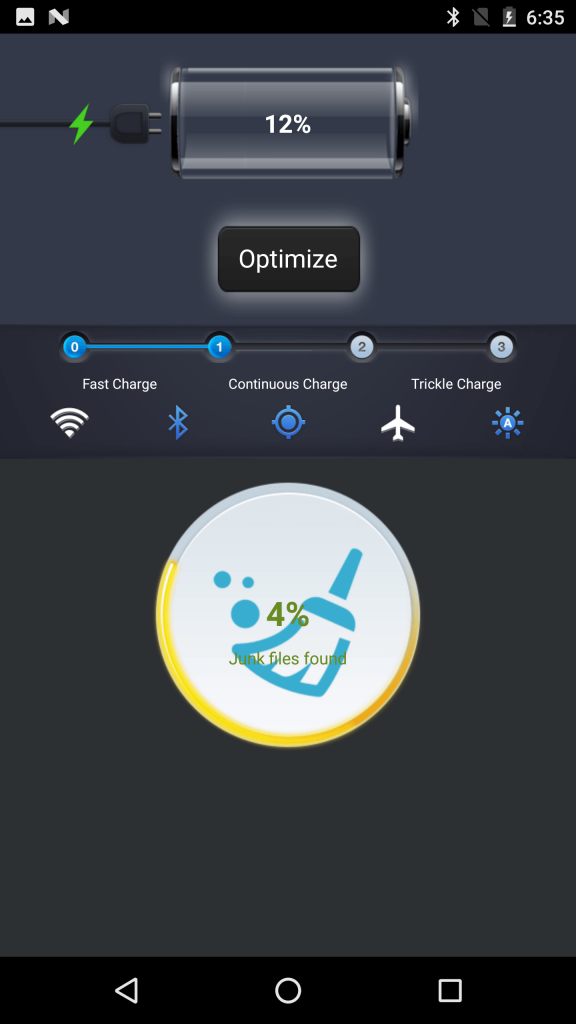
The malware targets WAP billing payment method and steals money from a targeted devices without the knowledge of the victim. The malware is hidden in utility apps such as BatteryMaster and claims to save battery time, but in reality, once the app is installed it loads malicious code on the targeted device.
Xafecopy Malware Secretly Steals Money From Android Devices
BatteryMaster app
From there, Xafecopy checks for websites with Wireless Application Protocol (WAP) billing feature and steals user money. The WAP billing is a type of mobile payment that charges fees directly to the user’s smartphone bill without the need of putting login credentials of card data. However, to bypass the ‘captcha’ system developed to protect users from theft and spams; the malware uses JavaScript files.
Furthermore, Xafecopy can also send SMS messages (most likely premium rate SMS), steal and delete incoming SMS messages.
Previously, Ztorg malware was found following similar tactics by using JavaScript files to by pass captcha.
Roman Unuchek, Senior Malware Analyst at Kaspersky Lab said that “WAP billing can be particularly vulnerable to so-called ‘clickjacking’ as it has a one-click feature that requires no user authorization. Our research suggests WAP billing attacks are on the rise. Xafecopy’s attacks targeted countries where this payment method is popular. The malware has also been detected with different modifications, such as the ability to text messages from a mobile device to Premium-rate phone numbers, and to delete incoming text messages to hide alerts from mobile network operators about stolen money.”
To protect yourself from this and other malware threats, Android users are advised not to download apps from third-party stores, do not install unnecessary apps and keep an eye on apps they download from Google Play Store since there are tons of malicious apps uploaded on the Store containing keyloggers logger and spyware.
Moreover, keep your devices updated, use a security software and scan your device on a daily basis.

terça-feira, 12 de setembro de 2017

ANDROID USERS VULNERABLE TO ‘HIGH-SEVERITY’ OVERLAY ATTACKS

by 


Security researchers warned of a high-severity Android flaw on Thursday that stems from what they call a “toast attack” overlay vulnerability. Researchers say criminals could use the Android’s toast notification, a feature that provides simple feedback about an operation in a small pop up, in an attack scenario to obtain admin rights on targeted phones and take complete control of them.

Affected are all versions of the Android operating system prior to Android 8.0, Oreo, released just last month.

Leveraging the toast vulnerability could allow attackers to facilitate what are known as “overlay” attacks on Android phones. Overlay attacks aren’t necessarily new. They all share the same goal of allowing attackers to create a UI overlay to be displayed on top of legitimate Android applications. The overlay then tricks users into clicking confirmation buttons or entering credentials into a fake window that will grab and forward them to a remote attacker.

“This type of (toast) attack can also be used to give malicious software total control over the device. In a worst-case attack scenario, this vulnerability could be used to render the phone unusable (i.e., a ‘brick’) or to install any kind of malware including (but not limited to) ransomware or information stealers,” wrote Christopher Budd, senior threat communications manager, for Unit 42 in a technical overview posted Thursday.

Android toast messages are short-lived pop up notifications that appear on a phone’s screen. Google describes them as, “a (notification) message you display to the user outside of your app’s normal UI.” For example, clicking “Send” on an email triggers a “Sending message…” toast, Google describes.

A toast-type overlay is similar to the overlay attack method known as Cloak and Dagger that came to light earlier this year, researchers said. This type attack leverages Android permissions tied to features called System Alert Window and Bind Accessibility Service. System Alert Windows allows an app to layer on top of another to display alerts. The Bind Accessibility Feature makes the Android user interface accessible to the visually impaired via descriptors of screen activities.

Toast attacks are similar, but do not require Android permissions to be granted by users.

“This newly discovered overlay attack does not require any specific permissions or conditions to be effective. Malware launching this attack does not need to possess the overlay permission or to be installed from Google Play. With this new overlay attack, malware can entice users to enable the Android Accessibility Service and grant the Device Administrator privilege or perform other dangerous actions,” according to a technical write-up on toast, also posted Thursday by Unit 42.

Additionally, researchers said it is possible to create a toast window that overlays an entire screen making it possible to use toast to create the functional equivalent of regular app windows. “In light of this latest research, the risk of overlay attacks takes on a greater significance,” researchers said.

A patch for the vulnerability (CVE-2017-0752) was released Tuesday as part of Google’s September Android Security Bulletin.

“Most people who run Android run versions that are vulnerable. This means that it’s critical for all Android users on versions before 8.0 to get updates for their devices,” researchers wrote.

quinta-feira, 24 de agosto de 2017

Over 500 Android Apps On Google Play Store Found Spying On 100 Million Users

Swati Khandelwal em 22/08/2017 no site The Hackers News

android-spyware-malware
Over 500 different Android apps that have been downloaded more than 100 million times from the official Google Play Store found to be infected with a malicious ad library that secretly distributes spyware to users and can perform dangerous operations.

Since 90 per cent of Android apps is free to download from Google Play Store, advertising is a key revenue source for app developers. For this, they integrate Android SDK Ads library in their apps, which usually does not affect an app's core functionality.

But security researchers at mobile security firm Lookout have discovered a software development kit (SDK), dubbed Igexin, that has been found delivering spyware on Android devices.

Developed by a Chinese company to offer targeted advertising services to app developers, the rogue 'Igexin' advertising software was spotted in more than 500 apps on Google's official marketplace, most of which included:

  • Games targeted at teens with as many as 100 million downloads
  • Weather apps with as many as 5 million downloads
  • Photo editor apps with 5 Million downloads
  • Internet radio app with 1 million downloads
  • Other apps targeted at education, health and fitness, travel, and emoji

Chinese Advertising Firm Spying On Android Users


The Igexin SDK was designed for app developers to serve targeted advertisements to its users and generate revenue. To do so, the SDK also collects user data to help target interest-based ads.
But besides collecting user data, the Lookout researchers said they found the SDK behaved maliciously after they spotted several Igexin-integrated apps communicating with malicious IP addresses that deliver malware to devices unbeknownst to the creators of apps utilizing it.

"We observed an app downloading large, encrypted files after making a series of initial requests to a REST API at http://sdk[.]open[.]phone[.]igexin.com/api.php, which is an endpoint used by the Igexin ad SDK," the researchers explain in a blog post. 
"This sort of traffic is often the result of malware that downloads and executes code after an initially "clean" app is installed, in order to evade detection."
Once the malware is delivered to infected devices, the SDK can gather logs of users information from their device, and could also remotely install other plugins to the devices, which could record call logs or reveal information about users activities.

How to Protect Your Android From This Malware


Google has since removed all the Android apps utilizing the rogue SDK from its Play Store marketplace, but those who have already installed one such app on their mobile handsets, make sure your device has Google Play Protect.

Play Protect is Google's newly launched security feature that uses machine learning and app usage analysis to remove (uninstall) malicious apps from users Android smartphones to prevent further harm.

In addition, you are strongly advised to always keep a good antivirus application on your device that can detect and block malicious apps before they can infect your device, and always keep your device and apps up-to-date.

Android malware continues to evolve with more sophisticated and never-seen-before capabilities with every passing day. Last month, we saw first Android malware with code injecting capabilities making rounds on Google Play Store.

A few days after that, researchers discovered another malicious Android SDK ads library, dubbed "Xavier," found installed on more than 800 different apps that had been downloaded millions of times from Google Play Store.